Monday.com
Use the Monday.com SaaS integration to orchestrate boards, items, subitems, and user directories directly from Appsmith. The built-in commands wrap common GraphQL mutations so you can create, update, search, or archive Monday records without wiring custom HTTP requests.
Connect Monday.com
Authenticate with a personal API token; Monday.com issues these tokens per user and they inherit the same permissions the user has in the UI. Refer to the monday.com authentication guide for the latest token-management steps.
- In Monday.com, open your profile menu and select Developers (all users) or Administration → Connections → Personal API token (admins only).
- Click API token → Show to copy the token, or Regenerate if you need to rotate credentials.
- Create a new Monday.com datasource and paste the copied value into the token field.
- Save the datasource.
Query Monday.com
Each command below maps to a preset mutation or query. Pick a command in the query editor, fill in the required parameters, and run the action to interact with your boards.
Create Item
Creates a new item on a board. Optionally target a group, attach an external ID, and hydrate any column values supported on the board.
Name string
Required. Title of the item as it should appear on the board.
Board Id string
Required. Numeric board identifier where the item will be created. You can copy it from the board URL (https://*.monday.com/boards/<boardId>).
Group Id string
Optional. Target group ID if you want the item to start inside a specific group within the board.
External Id string
Optional. Custom identifier you maintain in your system. Store the same value to fetch or update the item later via the external ID commands.
Column Values string
Optional JSON payload for initializing column data. Structure the string as serialized JSON following Monday’s column schema, for example:
{
  "status": "Done",
  "person": {
    "personsAndTeams": [
      { "id": 12345678, "kind": "person" }
    ]
  }
}
Update Item
Updates the attributes of an existing item, including the name and any board-specific columns.
Item Id string
Required. Identifier of the item to update.
Name string
Optional. New display name for the item.
Board Id string
Required. Board where the item resides; Monday uses this along with the item ID to route the mutation.
External Id string
Optional. External reference value you wish to add or update for downstream syncing.
Column Values string
Optional JSON string mirroring the board’s column structure. Supply only the fields you want to change.
Get Item by ID
Fetches a single item by its Monday item ID.
Item Id string
Required. Item identifier to retrieve. Use this when you already have the Monday-generated ID from another query or board URL.
Get Item by external ID
Retrieves an item that you previously tagged with an external ID.
Board Id string
Required. Board scope where the external ID exists.
External Id string
Required. External identifier stored when the item was created or updated.
Search Items
Searches for items using optional board filtering and pagination controls.
Board Id string
Optional. Filter results to a specific board. Leave empty to search across boards the token can access.
Pagination Parameters string
Optional JSON string for pagination options such as page size or cursor tokens. Provide the serialized GraphQL arguments expected by Monday’s search API.
Delete Item
Permanently deletes an item from a board. Use with caution because deletion cannot be undone via the API.
Item Id string
Required. Identifier of the item to delete.
Archive Item
Archives an item without deleting it. Archived items remain accessible in Monday’s recycle bin and can be restored later.
Item Id string
Required. Identifier of the item to archive.
Create Subitem
Creates a subitem under an existing parent item, allowing you to break initiatives into smaller tasks.
Name string
Required. Subitem title.
Parent Item Id string
Required. Identifier of the parent item that should own the new subitem.
Column Values string
Optional JSON string defining column defaults for the subitem. Matches the subitem board’s column schema.
Search Users
Searches the account’s users or retrieves a specific user by ID.
User Id string
Optional. Provide to fetch details for a single user; leave blank to run a broader user search or directory listing.
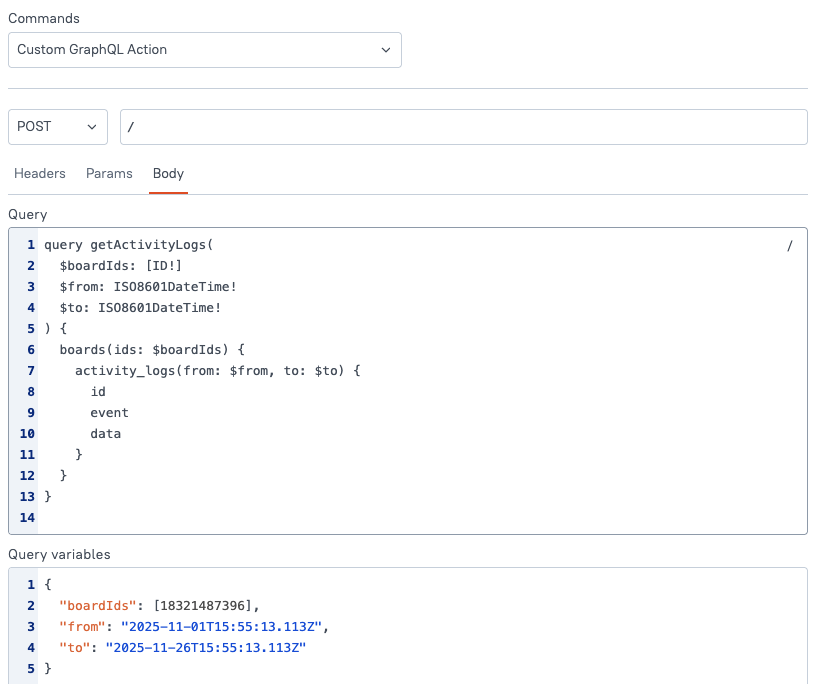
Custom GraphQL Action
Builds an ad-hoc GraphQL request when the canned commands do not cover your use case. Configure the method, headers, query/mutation body, and variables inline to call any Monday API supported by your token’s permissions.
Example configuration:
Use the activity_logs query to pull board-level audit info—this returns an array of log entries with metadata (timestamps, event names, payload) for the specified board. See Monday’s activity logs reference for limits, arguments, and fields.