Linear
Linear's unified query interface lets you create and manage issues, sub-issues, and projects directly from Appsmith. Each command returns JSON so you can wire Linear workflows into widgets, automations, or downstream datasources without custom wrappers.
Connect Linear
Authenticate with Linear using Appsmith's built-in OAuth portal—no tokens or client IDs are required.
- Go to Datasources → + New and pick Linear.
- Click Connect to open the Linear consent screen in a pop-up window.
- Review the scopes Appsmith requests (issue and project access) and click Authorize.
If you ever revoke the OAuth grant inside Linear, return to the datasource and click Reconnect to refresh the credentials.
Query Linear
All Linear commands return JSON that mirrors Linear's GraphQL schema. Use the Commands dropdown inside the query editor to switch between the supported operations listed below.
Create Issue
Creates a new issue for a team and returns the freshly created record (id, identifier, timestamps, and workflow metadata).
Team Id string
Title string
Description string
Status Id string
Priority integer
Due Date string
2025-12-31) that Linear uses to populate the due date chip.Cycle Id string
Search Issue or Linear's API.Additional Fields object
assigneeId, labelIds, or custom fields.{
"assigneeId": "a70bdf0f-530a-4887-857d-46151b52b47c",
"labelIds": ["de4ef1e9-9ac5-4a03-96a0-4d9686c8afee"]
}
Update Issue
Partially updates an existing issue—only the fields you send will change. The response includes the updated issue payload for downstream widgets.
Issue Id string
Title string
Description string
Status Id string
Priority integer
Due Date string
Cycle Id string
Additional Fields object
assigneeId or toggling custom booleans.Get Issue by ID
Fetches the full issue record using its canonical UUID—ideal for refreshing widgets after updates.
Issue Id string
Get Issue by Issue Identifier
Retrieves an issue using the friendly key shown in Linear (for example, ENG-142).
External Id string
Search Issue
Searches Linear issues with pagination and filtering using GraphQL API. Returns issues matching the filter criteria with pagination support.
Filter object
{} if not being used. Example:{
"team": {
"id": {
"eq": "team-id"
}
},
"state": {
"type": {
"eq": "started"
}
}
}
Limit integer
Cursor string
endCursor value from the pageInfo object in the previous response to fetch the next page.Delete Issue
Permanently removes an issue. Linear returns the deleted record's id so you can confirm the operation.
Issue Id string
Archive Issue
Soft-archives an issue so it no longer appears in active boards but can still be restored later.
Issue Id string
Create Sub Issue
Creates a child issue inside a parent issue's thread and inherits team metadata automatically.
Parent Id string
Team Id string
Title string
Description string
Additional Fields object
lead, assigneeId, or SLA custom fields.Create Project
Creates a Linear project spanning one or more teams and returns the project id for scheduling.
Team Ids string | array
Project Name string
Description string
Additional Fields object
{
  "state": "planned",
  "description": "Launch automation initiative"
}
Update Project
Updates an existing project. Send only the fields you want to change; the response returns the full record.
Project Id string
Project Name string
Description string
Additional Fields object
state, targetDate, or custom fields.Get Project by ID
Fetches a single project record for dashboards or automations.
Project Id string
Delete Project
Deletes a project permanently. Use with caution because Linear cannot restore deleted projects.
Project Id string
Search Teams
Searches Linear teams by name using GraphQL API. Returns teams matching the search criteria with optional member and state information.
Team Name string
Include Members boolean
false.Include States boolean
false.Custom GraphQL Action
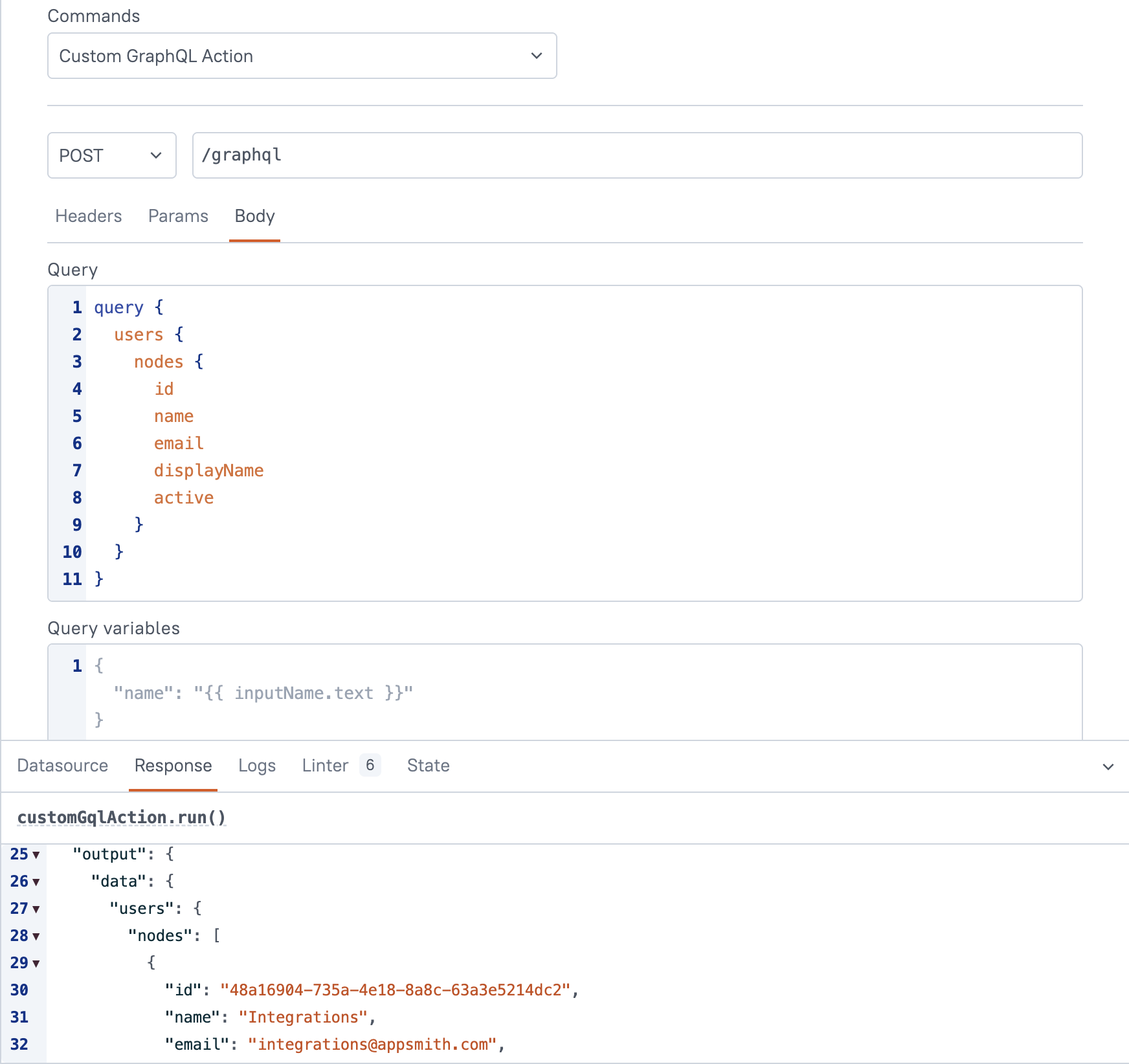
Build bespoke Linear calls with Custom Action when you need mutations or queries that are not exposed above.
Set the Custom Action type to POST and the endpoint to /graphql, then use the Body tab to craft the request body and variables. Follow the Linear GraphQL docs for available queries and mutations. Test the call before wiring it into widgets to make sure the schema matches your expectations.
Example: Query users
Troubleshooting
- Re-authenticate: If a query suddenly returns 401 errors, open the Linear datasource and click Reconnect to refresh the OAuth grant.
- Validate IDs: Copy
issueId,projectId, andteamIdstraight from Linear's URLs or API responses to avoid typos. - Inspect responses: Use the Run button and the Response panel to read Linear's error messages—they often call out missing scopes or malformed filter formulas.